Wednesday, September 15, 2021

Clear BNE Cache for WebADI Changes

It Sometime happens that WebAdi Changes doesn't reflect once migrated in controlled instances.

Here are the quick steps(Generally performed by DBA only).

1)- Pre-Requisite

    • A user must have System Administrator responsibility.

  • Login to your Application
  • Once you are on home page, get the URL of application
    • Example : https://XXTEST.abc.com
  • Ask DBA for Port number, Though it is generally 443 or 8443 for secure hosts
    • create new URL and hit this in new tab
      • https://XXTEST.abc.com:443/OA_HTML/BneAdminServlet


Clear cache.

Tuesday, December 29, 2020

Concurrent Requests Status and Phase Code Explained


Concurrent Request Status and Phase Code Combinations.

select  *  from apps.fnd_lookup_Values where lookup_type like 'CP_STATUS_CODE' AND VIEW_APPLICATION_ID =0

select  * from apps.fnd_lookup_Values where lookup_type like 'CP_PHASE_CODE' AND VIEW_APPLICATION_ID =0 


Thursday, December 10, 2020

Oracle Form Personalization Modifying Record Group Query on LOV : frm-40502: oracle error: unable to read list of values

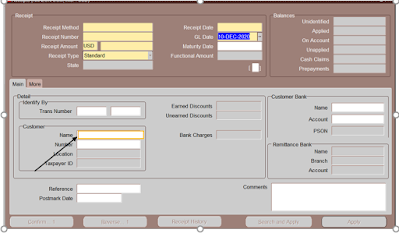
I had a requirement to modify LOV query for AR Receipt Form to restrict Customer for Specific Location.


Lov for Highlighted Field needs to be change


Step1:- Select Field that needs a Change in LOV, in this case it is Name, 

Go to                        Help --> Diagnostic --> Examine 

This will give you Exact Block_Name.Field_Name , In this case it is RGW_FOLDER.M_CUSTOMER_NAME


Step2: - We have to find out LOV Name mapped on the Name Field and corresponding Record group Query.

(Note - For following Step , make sure your Form Builder setup is completed. Copy resources, plsql and forms Folder from AU_TOP to your local and Add these folder in your Forms_Path.) 

Open FMB (ARXRWMAI.fmb) in your form builder, and search for M_CUSTOMER_NAME Field in RGW_FOLDER Block.

Check properties of this field and get LOV name. In our case it is "RGW_CUSTOMER_NAME_NOSKIP"

 
Now go to List of value section in the form and search for your LOV (RGW_CUSTOMER_NAME_NOSKIP) and get the Record Group name. In our case it is 'RGW_CUSTOMER_NAME'


Go to Record Group and Get the Query of this Record Group.

    select rtrim(substrb(party.party_name,1,50)) "party_name", 
               cust_acct.account_number "account_number", 
               party.jgzz_fiscal_code "jgzz_fiscal_code", 
               party.tax_reference "tax_reference", 
               cust_acct.cust_account_id "customer_id", 
               cust_acct.fob_point, 
               null "fob_point_meaning", 
               cust_acct.ship_via, 
               null "ship_via_meaning", 
               cust_acct.primary_salesrep_id, 
               null "primary_salesrep_name", 
               null "primary_salesrep_num" ,
               cust_acct.account_name account_description
        from hz_cust_accounts cust_acct,
                 hz_parties party, 
                 hz_customer_profiles cp 
        where cust_acct.cust_account_id = cp.cust_account_id (+)
                  and cust_acct.party_id = party.party_id 
                  and cp.site_use_id is null   
                  and (( (:ar_world.site_required_flag = 'Y' ) and
                    EXISTS (SELECT 1 FROM HZ_CUST_ACCT_SITES 
                           WHERE CUST_ACCOUNT_ID = CUST_ACCT.CUST_ACCOUNT_ID 
                             )
                             )
              or :ar_world.site_required_flag = 'N')


Step3:- Now we have to use the Record Group query identified in last step and modify it, as per our business requirement using Form Personalization.

        
    Go to       Help-->Diagnostic--> Custom Code--> Personalize

A)- Add New Entry 

Seq: XX

Description: Modify Bill to Customer Name LOV 

Condition : WHEN-NEW-ITEM-INSTANCE

Trigger Object : RGW_FOLDER.M_CUSTOMER_NAME


Add New Entry

B) -Go to Actions

Seq:1 

Type: Builtin

Builtin Type :  Create Record Group From Query

Argument : Type your Modified Query

Group Name: XX_AR_GRP_NAME


Note : Sometime Query May give an Error like frm-40502: oracle error: unable to read list of values, 

Make Sure the Field that is mapped with your Field i.e. Party Name doesn't have any Alias in this Case

"select party.party_name,
       cust_acct.account_number "account_number", 
       party.jgzz_fiscal_code "jgzz_fiscal_code", 
       party.tax_reference "tax_reference", 
       cust_acct.cust_account_id "customer_id", 
       cust_acct.fob_point, 
       null "fob_point_meaning", 
       cust_acct.ship_via, 
       null "ship_via_meaning", 
       cust_acct.primary_salesrep_id, 
       null "primary_salesrep_name", 
       null "primary_salesrep_num" ,
       cust_acct.account_name account_description
from hz_cust_accounts cust_acct,
     hz_parties party, 
     hz_customer_profiles cp 
where cust_acct.cust_account_id = cp.cust_account_id (+)
  and cust_acct.party_id = party.party_id 
  and cp.site_use_id is null   
  and (
        EXISTS (SELECT 1 
                     FROM HZ_CUST_ACCT_SITES_all HCAS,
                       hz_cust_site_uses_all hcsua,
                         hz_party_sites hps
                         ,hz_locations hl
                   WHERE CUST_ACCOUNT_ID = CUST_ACCT.CUST_ACCOUNT_ID 
                    AND hcsua.cust_acct_site_id = hcas.cust_acct_site_id
                                and hcas.party_site_id=hps.party_site_id
                                    AND hps.location_id = hl.location_id
                                 and hl.country = 'XX' -- Select a Particular Country Customer
                         and hcsua.site_use_code= 'BILL_TO'
                             )
         )"


C)- 2nd Action
   
     Seq 2: 
    
     Type: Property
     
    Object Type : LOV
 
    Target Object : Name of LOV identified in 2nd Step (RGW_CUSTOMER_NAME_NOSKIP
     
    Property Name: GROUP_NAME

    Value : XX_AR_GRP_NAME
 

Save You work Close the Form and try LOV, it should have been modified.


Happy Learning!!!!


Wednesday, December 02, 2020

UMX/ Roles Security Queries

 -- Who all Users a particular Role/Responsibility Is Assigned

Select wlur.USER_NAME,

wfr.display_name,

wlur.ROLE_NAME,

wrh.super_name,

wfr.description,

wlur.ASSIGNMENT_REASON,

wrh.relationship_id,

wlur.START_DATE,

wlur.EXPIRATION_DATE,

wlur.EFFECTIVE_START_DATE,

wlur.EFFECTIVE_END_DATE

from APPS.WF_LOCAL_USER_ROLES wlur,

APPS.WF_ROLE_HIERARCHIES  wrh,

apps.UMX_ALL_ROLE_VL wfr

WHERE 1=1

AND wlur.role_name = wrh.sub_name (+)

and wfr.name =  wlur.role_name 

and wlur.USER_NAME = 'XXXXXX'  -- USER NAME

and sysdate between wlur.EFFECTIVE_START_DATE and wlur.EFFECTIVE_END_DATE

--and wfr.display_name like 'Receivables - Limited Access' ---- Responsibility Name

--and role_name ='FND_RESP|SQLGL|AMZ_GL_LOOK_CODE_MGR|STANDARD' -- Role Name

order by wlur.ROLE_NAME 


-- Responsibility and Role Name Join

SELECT --asn.LOOKUP_ASSIGNMENT_ID, 

uar.display_name "Responsbility Name",

uar.description "Responsiblity Description",

flv.MEANING "Role Category" ,

     fat.application_name,

     flv.description "Role Description",

asn.LOOKUP_TYPE CATEGORY_LOOKUP_TYPE, 

asn.LOOKUP_CODE CATEGORY_LOOKUP_CODE, 

asn.INSTANCE_PK1_VALUE WF_ROLE_NAME, 

uar.orig_system

FROM apps.fnd_lookup_assignments asn, 

apps.fnd_lookup_values_vl flv ,

apps.umx_all_role_vl uar,

apps.fnd_application fa,

apps.fnd_application_tl fat

WHERE flv.lookup_type = asn.LOOKUP_TYPE 

AND flv.lookup_code = asn.LOOKUP_CODE 

and uar.name = asn.INSTANCE_PK1_VALUE

and fa.application_short_name  = uar.owner_tag

and fa.application_id = fat.application_id

and fat.source_lang ='US'

AND flv.lookup_type = 'UMX_CATEGORY_LOOKUP' 

AND asn.obj_name = 'UMX_ACCESS_ROLE'

AND uar.status ='ACTIVE'

-- and asn.LOOKUP_CODE like '%AR%'

-- AND FA.APPLICATION_SHORT_NAME = 'SQLAP'

--and flv.MEANING = 'General Ledger Closer' ----- Role Description from Request Access Page

--and asn.INSTANCE_PK1_VALUE = 'FND_RESP|SQLAP|AMZ_AP_CN_ACCESS|STANDARD'

and uar.DISPLAY_NAME  = 'NZ - Receivables Inquiry' -- Responsibiity Name


--Assign a Security Admin Role to a User 

Begin

wf_local_synch.PropagateUserRole(

     p_user_name => 'XXXXXXX',

     p_role_name => 'UMX|SECURITY_ADMIN',

     p_start_date=> SYSDATE);

commit;

end;


Monday, September 21, 2020

User Preferences Values

Sometimes, we need to Update/retrieve User Preferences values Setup at User level in our code/Specifically in User specific application logic building.

So here are few pointers , one ought to know while working with User references.

 --> User Preferences are nothing but the System Profiles (Default from Site Level), starting with 'ICX%'%


 If some one Updates his/her user presences from EBS Home Page, updated values automatically gets reflects in System profiles as well  at the User Level (Not on Site level). 


 --> Function to get These values,

SELECT FND_PROFILE.VALUE_SPECIFIC('ICX_DATE_FORMAT_MASK',<USER_ID>) FROM DUAL;

This function retrieves the value from profiles for a specific User , if their is no value found at user value it further goes down to site value level and fetch the value.


Below query also can be used to get the values , those are updated at User level.


SELECT

    VAL.PROFILE_OPTION_VALUE, OPT.PROFILE_OPTION_NAME,val.PROFILE_OPTION_ID

FROM

    APPLSYS.FND_PROFILE_OPTION_VALUES VAL,

    APPLSYS.FND_PROFILE_OPTIONS OPT,

    APPLSYS.FND_USER FUSER

WHERE

    VAL.PROFILE_OPTION_ID = OPT.PROFILE_OPTION_ID

    AND VAL.LEVEL_VALUE = FUSER.USER_ID

  --  AND OPT.PROFILE_OPTION_NAME LIKE 'ICX%'

    AND VAL.LEVEL_ID = 10004 -- USER LEVEL

    AND FUSER.USER_NAME = 'DEMOUSER';


Friday, September 18, 2020

Extend the existing translation (xlf) files for multiple languages


Sometime we need to extend/Enhance the existing Translation files in EBS Templates, here is the solution


Root cause : The issue with the translation of the report is because the trans unit block going in different language xlf files for new fields  of the report was different.


Solution : It’s a mandatory for translation to work that the trans unit id defined in the different language xlf files for the same fields or words  of the report needs to be same.


Below is the approach which needs to be followed for adding the new field in the existing xlfs  files :

1).Add the new element to  the rtf (taking example of the XX proforma report  XXCUST_AR_PROF_REPORT-01_en_US.rtf ).After saving the changes upload the rtf to its template XXCUST_AR_PROF_REPORT-01 .Thereafter, download the xlf file of the rtf you just uploaded by clicking export translations. (highlighted in yellow)


After clicking the export translation , it will ask to save/open the file .Save it.


2).Opening the above downloaded file , look for the new field you added. Copy the trans unit block for it and paste it in other xlfs present for that report.

Source is the field for which you need the translation to happen.

Target is the corresponding translated value for it.

Below is the screenshot from the  XXDON_AR_PROF_REPORT-01_en_US.xlf file( Saved in step 1).


Hope that helps!!!

Friday, September 04, 2020

DBC file path for J Developer

In the previous version of EBS (11.1....) , DBC file used to store in $FND_TOP/secure path under

"apps/apps_st/appl/fnd/12.0.0/secure."


Whereas in R12 version , location of DBC file changed to $FND_SECURE, this can be found under

"/appsDEV/inst/apps/DEV_rdcdxerpap01/appl/fnd/12.0.0/secure" Location

Tuesday, June 30, 2020

Convert Client Time zone date to Server Time Zone Date

Convert Client Time zone date to Server Time Zone Date


Select TO_CHAR (FND_TIMEZONES_PVT.ADJUST_DATETIME
                                (LAST_ACCPET_DATE, FND_TIMEZONES.GET_SERVER_TIMEZONE_CODE,
                                                                   FND_TIMEZONES.GET_CLIENT_TIMEZONE_CODE),
                                                                   'DD-MON-YYYY HH24:MI:SS')
 from PO_LINE_LOCATIONS_ALL where line_location_id =xxxxxxxx;

Thursday, June 25, 2020

Wednesday, June 03, 2020

Delete Attachment in EBS

Hi,

If you are looking for a code that can favor you to Delete multiple/Single attachments, here is an oracle provided API that do fortunes with Attachments.

API Name:
fnd_attached_documents2_pkg 


  1. If you want to delete all the attachments from specific transaction for example, Attachments from Sales order Headers or say GL Journal Header  , do Use
Procedure "DELETE_ATTACHMENTS
           This procedure attracts 3 mandatory parameters and those are

      • ENTITY_NAME-->TABLE_NAME
      • PK1_VALUE --> Transaction_Id (can be OrdeR_Header_id, Journal_Header_id)
      • Delete_document_Flag --> 'Y'
This will delete all the available attachments from the Transaction.


2. If you want to delete Single attachments from specific transaction for example, Sequence No 10 from Attachments from Sales order Headers or say GL Journal Header  , do Use


Procedure "DELETE_ATTACHMENT" 

           This procedure attracts 2 mandatory parameters and those are
  • attachment_document_id--> fnd_attached_docs_form_vl%attachment_document_id
  • Delete_document_Flag --> 'Y'
This will delete Specific attachment (corresponding to the specific attachment_document_id) from fnd_attached_docs_form_vl

Tuesday, November 05, 2019

Defining Link Stage for Request Set

Hi,

To trigger one program from another in a set up of Request Set, Link stage plays a Vital role.

One need to mention the excutability depending on 1st program.

For example: If 1st program completes successfully or completes in Warning or Errors Out , 2nd program should trigger appropriately.

It can be setup in
Request set-->> Link Stage step.


Friday, October 04, 2019

Oracle EDI gateway

List of Available EDI Transations.


ASC X12 EDIFACT Document ID Description

Inbound Transactions
810 INVOIC INI Inbound Invoice
832 PRICAT CATI Inbound Price / Sales Catalog
843 QUOTES RRQI Inbound Response to Request for Quote
850 ORDERS POI Inbound Purchase Order
856 DESADV ASNI Inbound Ship Notice / Manifest
857 No equivalent SBNI Inbound Shipping and Billing Notice

Outbound Transactions
824 APERAK ADVO Outbound Application Advice
810 INVOIC INO Outbound Invoice
820 PAYORD / REMADV PYO Outbound Payment Order / Remittance Advice
830 DELFOR SPSO Outbound Planning Schedule
862 DELJIT SSSO Outbound Shipping Schedule
850 ORDERS POO Outbound Purchase Order
860 ORDCHG POCO Outbound Purchase Order Change Request
856 DESADV DSNO Outbound Ship Notice / Manifest

Thursday, September 26, 2019

OAF Page Deployment in EBS R12 Server


OAF Page Deployment in R12

File deployment in OAF follows MVC framework as

·       Model: Entity Objects (EO), View Objects (VO), Application Module (AM), View Links (VL), Association Objects (AO)
·       View (MDS i.e. needs to deploy these files in DB server): Page (PG), Regions (RN)
·       Controller: All CO files

Types of files available in OAF from source code point of view: .java, .xml

Application server only recognizes .class file i.e. compiled version of .java files
.XML files -> (MDS) Metadata files

From Local directory, we have to move .class + .xml files to Application server at $JAVA_TOP

Location of files in OAF development

Source Code location
Compiled file location
$JDEV_USER_HOME/myclasses (.java, .xml files)
$JDEV_USER_HOME/myprojects (.class, .xml files)

$JDEV_USER_HOME: Environment variable set for JDeveloper to work.

Steps for deployment:

1.       Copy all the files from local directory to application Server in $JAVA_TOP.
Echo $JAVA_TOP in putty, get the path and open in Server (Winscp path).
2.       Keep the $JDEV_USER_HOME/myclasses folder at left side in winscp and $JAVA_TOP at right side.


3.       Please ensure all the dependent files are kept in sync to migrate in Server.
4.       Copy your folder from Local to JAVA_TOP in Binary Format.


5.       Keep all the xxxPG.xml files in MDS layer i.e. DB Server then only these files will be read reason being View Layer is part of MDS files.
6.       To Achieve above step 5, Go to jdevbin/oaext/bin folder in Jdeveloper Folder directory. Open Command Prompt (CMD) and navigate this whole path in CMD like below.


7.       Give a command ‘Import’ from this location Enter and copy the text from the Field: Example1 in Notepad. Purpose of this command is to deploy your View Component i.e. page.xml in MDS i.e. Database.


8.       Copy the Example1 text and replace with your structure like below.

Example1: import d:\jdeveloper\jdev\myprojects\pages\mypage.xml -rootdir d:\jdeveloper\jdev\myprojects -userId 1 -rootPackage /oracle/apps/ak -username jdr -password jdr -dbconnection "(description = (address_list = (address = (community = tcp.world)(protocol = tcp)(host =incq027bc.idc.oracle.com)(port = 1521)))(connect_data = (sid = des9i2)))" -jdk13


Import C:\A_Shobhit\Donaldson\Development\Development\OAF\p9879989_R12_GENERIC\jdevhome\jdev\myclasses\xyz\oracle\apps\fnd\webui\EmployeeInfoPG.xml -rootdir C:\A_Shobhit\Donaldson\Development\Development\OAF\p9879989_R12_GENERIC\jdevhome\jdev\myclasses -username apps -password apps -dbconnection "(description = (address_list = (address = (community = tcp.world)(protocol = tcp)(host = rdcdxerpdb01.donaldson.com)(port = 1521)))(connect_data = (sid = dev55)))"

Change Your instance specific information, like -rootdir, remove userid 1 -rootpackage, username, password, host and Sid.
Copy this import command and run in CMD again.

This will import your structure.


Importing file "C:\A_Shobhit\Donaldson\Development\Development\OAF\p9879989_R12_GENERIC\jdevhome\jdev\myclasses\xyz\oracle\apps\fnd\webui\EmployeeInfoPG.xml" as "/xyz/oracle/apps/fnd/webui/EmployeeInfoPG".

Import command should deploy View component i.e. Page/Region in MDS or Database.

9.       Let’s verify this in DB tables if import command worked successfully or not.

Jdr_paths, jdr_components, jdr_attributes

SELECT * FROM jdr_paths where path_name ='EmployeeInfoPG';--- Hold information about Page and top Level   
                                                                                                                          structure

SELECT * FROM jdr_components where comp_docid=179149; -- Holds info about all the component in page

Select * from jdr_attributes where att_comp_docid=179149; -- Hold info about the attribute of each component.


10.    Now it’s time to register the OAF file in Oracle Application

 Login in Oracle Apps à Application Developer responsibilityà Applicationà Function

Provide function and User Function name any relevant value.


Select “SSWA jsp function” as Type in Property Tab.


Get the OAF Page URL by running Page from Jdeveloper or its the same string generated in Step 8 above and deployed in DB. “/xyz/oracle/apps/fnd/webui/EmployeeInfoPG”, Suffix it with OA.jsp?page=

OA.jsp?page=/xyz/oracle/apps/fnd/webui/EmployeeInfoPG and provide in Web HTML Tab in HTML Call.


11.   Once Function is created, its time to attach in Menu as usual oracle apps Steps. For testing created one Test menu.


12.   Assign This Menu/Function to Responsibility and Access your New OAF Page.

Tuesday, September 17, 2019

Oracle Business Event Code Example

Hi All,
Recently i had a requirement where client had to get rid of one of the repeated activity for assigning Newly created item to any Ship from Warehouse (Organization) to enable it for Sale.

For example ,

Customer XYZ is asking new product from OU "XYZ_OU".

Steps involved here is to Create New SKU (Item segment) and assign to organization from where we have to ship the inventory following by creating a Sales order and then follow the shipping process.

2nd step i.e. Assigning Item to organization was Automated using Business Event.

So whenever any Item is used in any sales order line and that item is not assigned to Ship from Warehouse at line level, we have to automatically Assign item whenever order is booked.

Code to achieve this functionality


CREATE OR REPLACE function APPS.XXZYX_ITEM_ASSIGN_ACCT_ORG(
                                            p_subscription_guid_in          IN RAW,
                                            p_event_in_out               IN apps.wf_event_t)
   RETURN VARCHAR2
     IS
   pvg_oe_header               VARCHAR2 (25)  := 'HEADER_ID';
   pvg_oe_line                 VARCHAR2 (25)   := 'LINE_ID';
   pvg_event_key               VARCHAR2 (50);
   pvg_parameter_list          apps.wf_parameter_list_t;
   pvg_user_id_num             fnd_user.user_id%TYPE := apps.fnd_global.user_id;
   pvg_login_id_num            NUMBER             := apps.fnd_global.login_id;
   pvg_resp_id_num             NUMBER              := apps.fnd_global.resp_id;
   pvg_resp_appl_id_num        NUMBER         := apps.fnd_global.resp_appl_id;
   lv_oe_header_id             apps.oe_order_headers_all.headeR_id%type;
   lv_org_id                    NUMBER;
   lv_ord_num                   VARCHAR2(100);
   lv_flag                     VARCHAR2(10);
 
   l_getEventName             varchar2(1000);
   l_getEventKey                varchar2(1000);
 
   l_param_name     VARCHAR2(100);
   l_param_value       varchar2(100);
 
 -------------Item Assignment API----------

        g_user_id             fnd_user.user_id%TYPE :=NULL;
        l_appl_id             fnd_application.application_id%TYPE;
        l_resp_id             fnd_responsibility_tl.responsibility_id%TYPE;
        l_api_version   NUMBER := 1.0;
        l_init_msg_list       VARCHAR2(2) := fnd_api.g_false;
        l_commit       VARCHAR2(2) := FND_API.G_FALSE;
        x_message_list        error_handler.error_tbl_type;
        x_return_status   VARCHAR2(2);
        x_msg_count       NUMBER := 0;
 
   BEGIN
   pvg_parameter_list := p_event_in_out.getparameterlist ();

   l_getEventName := p_event_in_out.getEventName ();
   l_getEventKey :=p_event_in_out.getEventKey ();

    IF pvg_parameter_list IS NOT NULL
      THEN
         FOR i IN pvg_parameter_list.FIRST .. pvg_parameter_list.LAST
         LOOP
       
          IF wf_event.getvalueforparameter ('LINE_ID', pvg_parameter_list) IS NULL
           THEN
            --if the line id is null, then this event was fired from header level, insert the record into event table
            IF (pvg_parameter_list (i).getname () = pvg_oe_header)
            THEN
               lv_oe_header_id :=
                               TO_NUMBER (pvg_parameter_list (i).getvalue ());
            end if;

         
     BEGIN

        fnd_global.apps_initialize (USER_ID, RESP_ID, RESP_APPL_ID);

for i in
        (select inventory_item_id from
        oe_order_lines_all
        where header_id=lv_oe_header_id)
        loop

        EGO_ITEM_PUB.ASSIGN_ITEM_TO_ORG(
                   P_API_VERSION          => l_api_version
                ,  P_INIT_MSG_LIST        => l_init_msg_list
                ,  P_COMMIT               => l_commit
                ,  P_INVENTORY_ITEM_ID    => i.inventory_item_id
                ,  p_organization_id      => 163-----Ship from warehouse ID
                ,  X_RETURN_STATUS        => x_return_status
                ,  X_MSG_COUNT            => x_msg_count
            );
        DBMS_OUTPUT.PUT_LINE('Status: '||x_return_status);
        IF (x_return_status <> FND_API.G_RET_STS_SUCCESS) THEN
          DBMS_OUTPUT.PUT_LINE('Error Messages :');
          Error_Handler.GET_MESSAGE_LIST(x_message_list=>x_message_list);
            FOR j IN 1..x_message_list.COUNT LOOP
              DBMS_OUTPUT.PUT_LINE(x_message_list(j).message_text);
            END LOOP;
        END IF;
      end loop;
EXCEPTION
        WHEN OTHERS THEN
          dbms_output.put_line('Exception Occured :');
          DBMS_OUTPUT.PUT_LINE(SQLCODE ||':'||SQLERRM);
END;


           --
            l_param_name := pvg_parameter_list (i).getname;
            l_param_value := pvg_parameter_list (i).getvalue;

            --
            INSERT INTO xx_be_debug_log_tmp
                        (text
                        )
                 VALUES (l_param_name || '  :   ' || l_param_value);

            COMMIT;
         END IF;
         --
         END LOOP;
      END IF;

      COMMIT;
      RETURN 'SUCCESS';
   EXCEPTION
   WHEN OTHERS
   THEN
      RETURN 'SUCCESS';
   
   END;
/


Then This function needs to be add as Subscription on Sales order booking event i.e.

 oracle.apps.ont.oip.statuschange.update.

Once Subscription is done properly, Test your case.

Monday, June 10, 2019

Concurrent program Logs to analyze OPP errors/Other standard Exception


Concurrent program Logs


a) Concurrent Request Log:
select logfile_name from fnd_concurrent_requests where request_id = <request_id>;

b) Concurrent Output file:
select outfile_name from fnd_concurrent_requests where request_id = <request_id>;

c) Concurrent Manager Worker Log:
select logfile_name from fnd_concurrent_processes where concurrent_process_id=(select controlling_manager
from fnd_concurrent_requests where request_id=<request_id>);

d) FNDOPP log file
SELECT fcpp.concurrent_request_id req_id, fcp.node_name, fcp.logfile_name
FROM fnd_conc_pp_actions fcpp, fnd_concurrent_processes fcp
WHERE fcpp.processor_id = fcp.concurrent_process_id
AND fcpp.action_type = 6
AND fcpp.concurrent_request_id =<request_id>;

Clear BNE Cache for WebADI Changes

It Sometime happens that WebAdi Changes doesn't reflect once migrated in controlled instances. Here are the quick steps(Generally perfor...