Showing posts with label XML Publisher. Show all posts

Friday, September 18, 2020

Extend the existing translation (xlf) files for multiple languages


Sometime we need to extend/Enhance the existing Translation files in EBS Templates, here is the solution


Root cause : The issue with the translation of the report is because the trans unit block going in different language xlf files for new fields  of the report was different.


Solution : It’s a mandatory for translation to work that the trans unit id defined in the different language xlf files for the same fields or words  of the report needs to be same.


Below is the approach which needs to be followed for adding the new field in the existing xlfs  files :

1).Add the new element to  the rtf (taking example of the XX proforma report  XXCUST_AR_PROF_REPORT-01_en_US.rtf ).After saving the changes upload the rtf to its template XXCUST_AR_PROF_REPORT-01 .Thereafter, download the xlf file of the rtf you just uploaded by clicking export translations. (highlighted in yellow)


After clicking the export translation , it will ask to save/open the file .Save it.


2).Opening the above downloaded file , look for the new field you added. Copy the trans unit block for it and paste it in other xlfs present for that report.

Source is the field for which you need the translation to happen.

Target is the corresponding translated value for it.

Below is the screenshot from the  XXDON_AR_PROF_REPORT-01_en_US.xlf file( Saved in step 1).


Hope that helps!!!

Friday, September 01, 2017

XMLP Report Generated through PL SQL


Generate a XML Report from PL SQL Package.


CREATE OR REPLACE PACKAGE BODY XXORT_TEST_USER
AS

  PROCEDURE XXORT_USER (ERRBUF  VARCHAR2,
                        RETCODE  NUMBER,
                        XORDER_NUM IN VARCHAR2)
     IS
     CURSOR C_HEAD IS
        SELECT ORDER_NUMBER,
               HEADER_ID,
               FLOW_STATUS_CODE
         FROM OE_ORDER_HEADERS_ALL
         WHERE ORDER_NUMBER=XORDER_NUM;
        
     CURSOR C_LINES (P_HEADER_ID IN VARCHAR2)
     IS
        SELECT  ORDERED_ITEM, ORDERED_QUANTITY , LINE_ID
        FROM OE_ORDER_LINES_ALL
        WHERE HEADER_ID= P_HEADER_ID;
       
       
      LV_LOT_NUMBER VARCHAR2(100);
    
     BEGIN
    
       FND_FILE.PUT_LINE(FND_FILE.OUTPUT , '<?xml version="1.0" encoding="UTF-8"?>');
       FND_FILE.PUT_LINE(FND_FILE.OUTPUT , '<ORDER_INFO>');
         
            FOR RC_HEAD IN C_HEAD
             LOOP
            
              FND_FILE.PUT_LINE(FND_FILE.OUTPUT , '<P_ORDER_HEADER>');

              FND_FILE.PUT_LINE(FND_FILE.OUTPUT , '<ORDER_NUMBER>' || RC_HEAD.ORDER_NUMBER || '</ORDER_NUMBER>');
              FND_FILE.PUT_LINE(FND_FILE.OUTPUT , '<HEADER_ID>' || RC_HEAD.HEADER_ID || '</HEADER_ID>');
              FND_FILE.PUT_LINE(FND_FILE.OUTPUT , '<FLOW_STATUS_CODE>' || RC_HEAD.FLOW_STATUS_CODE || '</FLOW_STATUS_CODE>');
            
            
                  FOR RC_LINES IN C_LINES (RC_HEAD.HEADER_ID)
                         LOOP
                                 
                        
                         BEGIN
                        
                         SELECT LOT_NUMBER
                         INTO LV_LOT_NUMBER
                         FROM WSH_DELIVERY_DETAILS
                         WHERE SOURCE_LINE_ID = RC_LINES.LINE_ID;
                        
                         EXCEPTION
                         WHEN OTHERS
                         THEN NULL;
                        
                         END ;                
                          FND_FILE.PUT_LINE(FND_FILE.OUTPUT , '<P_ORDER_LINES>');

                          FND_FILE.PUT_LINE(FND_FILE.OUTPUT , '<ORDERED_ITEM>' || RC_LINES.ORDERED_ITEM || '</ORDERED_ITEM>');
                          FND_FILE.PUT_LINE(FND_FILE.OUTPUT , '<ORDERED_QUANTITY>' || RC_LINES.ORDERED_QUANTITY ||  '</ORDERED_QUANTITY>');
                          FND_FILE.PUT_LINE(FND_FILE.OUTPUT , '<LOT_NUMBER>' || LV_LOT_NUMBER ||  '</LOT_NUMBER>');
                         
                          FND_FILE.PUT_LINE(FND_FILE.OUTPUT , '</P_ORDER_LINES>');
                        
                         END LOOP;
                    FND_FILE.PUT_LINE(FND_FILE.OUTPUT , '</P_ORDER_HEADER>');    
             END LOOP;
    
     FND_FILE.PUT_LINE(FND_FILE.OUTPUT , '</ORDER_INFO>');
     END ;


END XXORT_TEST_USER;

Thursday, April 07, 2016

No Data found or End of Report Printing in Report


It is similar to IF condition.
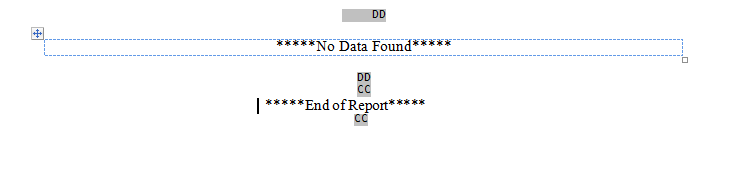
Say the requirement is to display “No Data Found  if the Report does not fetch any values” else it should display “End of Report”.
<?if:CF_COUNT= 0?>
*****No Data Found*****
<?end if?>
<?if:CF_COUNT != 0?>
   *****End of Report*****
<?end if?>
CF_COUNT is a formula column in the rdf returning the count of records returned.
Image

In & Out f XML Bursting

Oracle Bursting Mechanism enables us to deliver a single XML Publisher report/letter to multiple destinations simultaneously. This is a very helpful feature especially if you are trying to send the output of a report to an email address or multiple email address.The output is sent via email. User does not need to login to Oracle to get the report.
Picture1
Pre-requisite
1.SMTP configuration
2.Change the temporary directory location.
  • A temporary directory has to be provided for XML Publisher engine to use for bursting.
  • Responsibility: XML Publisher Administrator
  • Navigation: Administration tab
Picture2
3. Attach Seeded Program to the Responsibility: XML Publisher Report Bursting Program
The following Bursting File needs to be attached to the Data Definition of the BI Publisher report that you are trying to burst :
<!–?xml version=”1.0″ encoding=”UTF-8″?>
<xapi:requestset xmlns:xapi=”http://xmlns.oracle.com/oxp/xapi”&gt;
<xapi:request select=”/PERSON/LIST_G_FIRST_NAME”>
<xapi:delivery>
<xapi:email server=”ATANML01.at.adsonydadc.com” port=”25″ from=“XYZ@XXX.com” reply-to =“ABC@XXX.com”>
<xapi:message id=”123″ to=“${EMAIL}” attachment=”true” subject=“Busting Report”>
Busting Report Body
<!–xapi:message>
<!–xapi:email>
<!–xapi:delivery>
<xapi:document output=”${EMPLOYEE_NUMBER}” output-type=”excel” delivery=”123″>
<xapi:template type=”rtf” location=”xdo://PER.XX_PERSON.en.00/?getSource=true” filter=””>
<!–xapi:document>
<!–xapi:request>
<!–xapi:requestset>
Explanation of the bursting template

XML Tags

Explanation

xapi:request select=This tag in the control file indicates from which tag/node in the concurrent program output XML should separated for bursting
xapi:deliveryThis node contains all email related attributes
xapi:emailThis tag contains the email attributes like,server or the email server IP or nameport or the email server portfrom or the email address from which the server should send the emailreply-to or the email address to which the replies should be sent
xapi:messageThis tag contains the attributes about the email like,To or the email address where the email should be sentSubject or the email subjectattachment , i.e. if the email should contain an attachmentThe mail body will be enclosed within the tags
xapi:documentThis node contains the attachment document and XML template related tags and attributes.The attributes in this tag are related to the email attachmentOutput or attachment file nameOutput-type or attachment file type
xapi:templateThe node contains the template information like,Type or the file type of the template
Attach the Bursting File to Data Definition
Responsibility: XML Publisher Administrator
Navigation: Data Definition
XMLBursting021
The bursting process is now complete.
Automatic execution of XML Publisher Report Bursting Program
Since the bursting program, XML Publisher Report Bursting Program, has to be run manually this might not be feasible for all users to use. The bursting program can be executed automatically if we use a rdf report to generate the data for the XML publisher report. In a rdf report we can add the following piece of code in the After Report trigger in the report to execute the bursting program as soon as the output has been generated by the report.
function AfterReport return boolean is
req_id NUMBER;
err varchar2(4000);
BEGIN
SRW.USER_EXIT(‘FND SRWEXIT’);
begin
req_id := fnd_request.submit_request (‘XDO’, — application
‘XDOBURSTREP’,– program short name
”, — description
”, — start time
FALSE, — sub request
‘N’, — argument1
: P_CONC_REQUEST_ID, — argument2
‘N’, — argument3
NULL, — argument4
NULL, — argument5
NULL, — argument6
CHR (0) — represents end of arguments
) ;
exception when others then
err:= sqlerrm;
srw.message(100,’exception ‘ || err);
end ;
if req_id = 0 then
srw.message(101,’failed to submit bursting program ‘);
else
srw.message(102,’request id for bursting program is ‘||req_id);
end if;
return (TRUE);
END;

Clear BNE Cache for WebADI Changes

It Sometime happens that WebAdi Changes doesn't reflect once migrated in controlled instances. Here are the quick steps(Generally perfor...