Showing posts with label Report. Show all posts

Wednesday, May 16, 2018

ORA-01861: literal does not match format string

Cause:  FDPSTP failed due to ORA-01861: literal does not match format string
ORA-06512: at line 1

Starting with Oracle Application Version 11.5.10.2, Oracle does not allow you to use FND_DATE4 parameters and instead recommends FND_STANDARD_DATE data type. Thus, concurrent program using date parameters would be assigned value set FND_STANDARD_DATE. 

The point to be noted here is, format mask for the FND_STANDARD_DATE data type is "YYYY/MM/DD HH24:MI:SS". However, in most of the date format in Oracle Database will have format mask "DD-MON-YYYY HH24:MI:SS". Because of difference in above two format masks, you get error "ORA-01861: literal does not match format string".

Following is the workaround to avoid such errors: 
1. Define the date parameter as VARCHAR2 in Oracle Procedure. 
2. Register Date Parameter in Concurrent Program with Value Set as "FND_STANDARD_DATE".
3. Use FND_DATE.CANONICAL_TO_DATE function to convert varchar2 value to oracle date format & then use this value in your oracle procedure. 

Example: 


CREATE PROCEDURE XX_TEMP (errbuf      OUT  VARCHAR2
                         ,retcode     OUT  VARCHAR2
                         ,i_from_date  IN  VARCHAR2
                         ,i_to_date    IN  VARCHAR2 
                         )
IS
   ld_from_date DATE := FND_DATE.CANONICAL_TO_DATE (i_from_date);
   ld_to_date   DATE := FND_DATE.CANONICAL_TO_DATE (i_to_date);

   /* Use  ld_from_date and ld_to_date instead of i_from_date and i_to_date in procedure */
END XX_TEMP;
/

Monday, March 27, 2017

What is Record to Reporting Cycle – R2R

Record to report or R2R is the management process for providing strategic, financial and operational feedback to understand how a business is performing.
This process involves collecting, transforming and delivering relevant, timely and accurate information to all stakeholders inside and outside the organization, to provide insight into how their expectations have been met.


It covers the steps involved in preparing and reporting the overall accounts which are typically stored in a general or nominal ledger and managed by a comptroller. The detailed steps involved are:
  • data extraction
  • data collection
  • data validation
  • data transformation (generation of voucher)
  • voucher posting (to general ledger)
  • storing vouchers in de-normalized and compressed format
  • generating analysis account trial balance or consolidated analysis account trial balance
  • generating user-defined financial and management reports
In ERP systems , This is part  month end  process in which basically user will close all the periods  and import all the journals in GL from other modules
(Payable, Receivable, Fixed Assets etc.). Then run all the month end GL reports like Trial Balance, Account Analysis  etc.
Following are broader division of activity involved in Record to Report Cycle
Reconciliations
  • Intercompany
  • Multiple systems
  • Bank
  • Subsidiary to main set of books
  • Customer
  • Vendor
General Accounting
  • Journal Entries
  • Intercompany accounting
  • Book closures
  • Trial Balance preparation
  • Accruals
  • Consolidations
  • Cost Accounting
Record to Report process might seem simple but it require considerable efforts. It is the only process scrutinized by outside auditors who draw conclusions about controls in place during financial close and reporting cycle.

Thursday, April 07, 2016

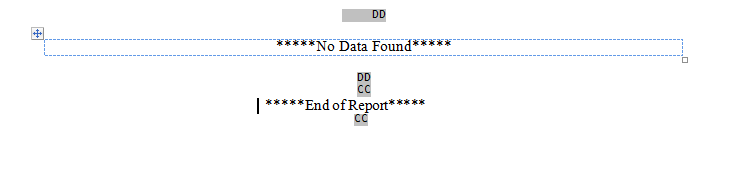
No Data found or End of Report Printing in Report


It is similar to IF condition.
Say the requirement is to display “No Data Found  if the Report does not fetch any values” else it should display “End of Report”.
<?if:CF_COUNT= 0?>
*****No Data Found*****
<?end if?>
<?if:CF_COUNT != 0?>
   *****End of Report*****
<?end if?>
CF_COUNT is a formula column in the rdf returning the count of records returned.
Image

Tuesday, December 01, 2015

Calculate Sales Order Tax and Lines / Order Total

Standard Package to show Sales order Line Basic/ Tax Value and Total Value (Basic+Tax)

Sometime we Need to show Line wise or Complete Order Taxes / Tax+Basic in few reports, for this , oracle has provided a standard Package to Calculate these values, based on parameter passed.


Package Name: oe_totals_grp.get_order_total

Below are the Illustration of this package with example.

For Example: 1 Order have 3 lines, and each one have taxes attached on it.


  Header ID: 23096

  Line ID: 36492----Line Value=1,045.00----Tax on this Line ----87.52----TOTAL VALUE---1132.52
  Line ID: 36494----Line Value=505.00-----Tax on This Line ----42.3-----T0TAL VALUE---547.3
  Line ID: 36495----Line Value=1,750.00---Tax on this Line ----146.56---T0TAL VALUE---1896.56


  Calculate Line wise Tax

    select nvl(oe_totals_grp.get_order_total (HEADER_ID, LINE_ID, 'TAXES'),0) from dual;
 
 For Ex:
 
    select nvl(oe_totals_grp.get_order_total (23096, 36492, 'TAXES'),0) LINE_Tax from dual;
   
    Output : LINE_Tax=87.52
 
 
  Calculate Order Taxes (All Lines)


    select nvl(oe_totals_grp.get_order_total (HEADER_ID, NULL, 'TAXES'),0) from dual;
 
 
   Ex:
 
   select nvl(oe_totals_grp.get_order_total (23096, null, 'TAXES'),0) Order_Tax from dual;
 
 
   Output : Order_Tax: 276.38


    Calculate Line wise Value (Without Tax)

    select nvl(oe_totals_grp.get_order_total (HEADER_ID, LINE_ID, 'LINES'),0) from dual;
 
 
    Ex:
 
      select nvl(oe_totals_grp.get_order_total (23096, 36492, 'LINES'),0)  LINE_BASIC from dual;
   
   
      Output : LINE_BASIC=1045
   
 
  Calculate All Lines Total (Without Tax)

    select nvl(oe_totals_grp.get_order_total (HEADER_ID, NULL, 'LINES'),0) from dual;
 
 
     Ex:
 
   select nvl(oe_totals_grp.get_order_total (23096, null, 'LINES'),0) Order_Basic from dual;
 
 
   Output : Order_Basic: 3300


   Calculate Line wise Value ( With Tax)

    select nvl(oe_totals_grp.get_order_total (HEADER_ID, LINE_ID, 'ALL'),0) from dual;
 
 
     Ex:
 
      select nvl(oe_totals_grp.get_order_total (23096, 36492, 'ALL'),0)  LINE_TOTAL from dual;
   
   
      Output : LINE_TOTAL=1132.52


  Calculate Order Total Value (With Tax)

    select nvl(oe_totals_grp.get_order_total (HEADER_ID, NULL, 'ALL'),0) from dual;
 
     Ex:
 
   select nvl(oe_totals_grp.get_order_total (23096, null, 'ALL'),0) Order_Total from dual;
 
 
   Output : Order_Total: 3576.38

Printing Address in standard Format in Formatted reports ,

Printing Address in standard Format , specified in  Oracle Package.


Create a Formula in Report, and pass the below values from Query.


function CF_SHIP_ADDRESSFormula return Char is
lv_address varchar2(2000);
begin

lv_address:= TRIM(arp_addr_pkg.format_address(NULL
                                   ,:ACCOUNT_NAME
                                   ,:SHIP_TO_ADDRESS1
                                   ,:SHIP_TO_ADDRESS2
                                    ,:SHIP_TO_ADDRESS3
                                  ,:SHIP_LOC_CITY||'|'||:SHIP_LOC_STATE||'|'||:SHIP_LOC_POSTAL_CODE
                                       ,NULL
                                       ,null
                                       ,NULL
                                       ,null
                                       ,null
                                       )
           );
return REPLACE(REPLACE(lv_address,', ',','||chr(10)),'|',',');
exception
when others then
return null;

end;

Monday, November 30, 2015

Print NO Data Found in XML Reports

Mark the Database Column based on what counting should be done.

For Example if, Report is related with Purchase order print , then PO_Header_id or Segment1 can be treated as Base Database Column from SQL Query.
or if report belongs to Order Management , and records are fetched based on Order numbers then HEADER_ID from oe_order_headers_all.


then on RTF template Use if/end if condition


<?if:count(//PO_HEADER_ID)=0?>
or
<?if:count(//HEADER_ID)=0?>


Friday, October 09, 2015

Print No Data Found in Oracle Report/ XML Report

I Have one Requirement to print No Data Found in Oracle Reports or XML Report Template,if my SQL Statement doesn't Return any Row.


We can do it in few ways.

A)-In rdf, we can define a summary column (say CF_COUNT) which counts the number of rows of a group, and in the rtf layout create a text form field and put the helptext as 

<?if:CF_COUNT=0?>No Data Found<?end if?>


B)-Other way to text in RTF Temaplate

In the RTF layout
create a text form field and put the help text as 


<?if: count(./LIST_G_SO_NUMBER/G_SO_NUMBER/LIST_G_SO_NUMBER1/G_SO_NUMBER1)=0?>No Data Found<?end if?>
where
./LIST_G_SO_NUMBER/G_SO_NUMBER/LIST_G_SO_NUMBER1/G_SO_NUMBER1
is the expected path to the group, from the root of the xml, that we define. This expression will count the number of occurances of the group "G_SO_NUMBER1" 


C)- Using Choose and When Option

Assume we have the following XML


<G_CUSTOMER>
 <CUSTOMER_NAME>A. C. Networks</CUSTOMER_NAME>
 <ZIP>84606</ZIP>
 <STATE>UT</STATE>
 <ADDRESS_LINE2/>
 <ADDRESS_LINE1>3405 East Bay Blvd.</ADDRESS_LINE1>
 <COUNTRY>US</COUNTRY>
 <CITY>Provo</CITY>
 <CUSTOMER_NUMBER>1143</CUSTOMER_NUMBER>
 <G_INVOICES>
  ...
 </G_INVOICES>
 <G_INVOICES>
  ...
 </G_INVOICES>
 <G_INVOICES>
  ...
 </G_INVOICES>
 <G_INVOICES>
  ...
 </G_INVOICES>
 </G_CUSTOMER>
<G_CUSTOMER>
 <CUSTOMER_NAME>Networks Inc</CUSTOMER_NAME>
 <ZIP>93934</ZIP>
 <STATE>CO</STATE>
 <ADDRESS_LINE2/>
 <ADDRESS_LINE1>8762 Rawlins Road</ADDRESS_LINE1>
 <COUNTRY>US</COUNTRY>
 <CITY>Castle Rock</CITY>
 <CUSTOMER_NUMBER>1143</CUSTOMER_NUMBER>
 <G_INVOICES/>
</G_CUSTOMER>

Notice the second CUSTOMER has a no INVOICES present. We can test for that and replace an invoice section with a 'No Data Found' string.

The 'if' statement in XSL does not have a 'then else' format i.e. all we have is 'if expr end if'. There is an alternative, the 'choose' statement, its a little verbose but we can use it.

<?choose:?>
 <?when:count(TRX_NUMBER) > 0?>
     Invoice Table
 <?end when?>
 <?otherwise:?>
     No Data Found
 <?end otherwise?>
<?end choose?>

Notice all we are doing is counting how many instances of TRX_NUMBER are present. If there are one or more present then the Invoice Table is rendered otherwise we get the 'No Data Found' string.

Sunday, October 04, 2015

Submitting XML Report using FND_REQUEST.SUBMIT_REQUEST

If you submit the concurrent Program (XML Report) from backend usingFND_REQUEST.SUBMIT_REQUEST, it will not take Attached Template(Layout) to the Concurrent Program. For this, we need to add Layout Explicitly using FND_REQUEST.ADD_LAYOUT before submitting the Concurrent Program (XML Report).


Sample Code:


DECLARE
   l_request_id               NUMBER;
   l_option_return            BOOLEAN;
BEGIN
   fnd_global.apps_initialize (user_id           => fnd_global.user_id,
                               resp_id           => fnd_global.resp_id,
                               resp_appl_id      => fnd_global.resp_appl_id
                              );
   l_option_return :=
      fnd_request.add_layout (template_appl_name      => 'SQLAP', --Application Short Name
             template_code           => 'XX_ABC_FORMAT', --Template Code
                              template_language       => 'En',
                              template_territory      => '00',
                              output_format           => 'PDF'
                             );
   /* Setting Printer Options , if we want print output of the Concurrent Program on Particular Printer*/
   l_option_return :=
      fnd_request.set_print_options (printer             => 'noprint',
                                     style               => 'LANDSCAPE',
                                     copies              => 1,
                                     save_output         => TRUE,
                                     print_together      => 'N'
                                    );
   l_request_id := fnd_request.submit_request (
        'SQLAP' ,
        'XX_ABC_SAMPLE_RDF' ,
        'SAMPLE REPORT',
        null,
        FALSE,
        CHR(0),
               CHR(0),
        CHR(0),
        CHR(0),
        CHR(0),
        CHR(0),
        CHR(0),
        CHR(0),
        CHR(0),
        CHR(0),
        CHR(0),
        CHR(0),
        CHR(0),
        CHR(0),
        CHR(0),
        CHR(0),
        CHR(0),
        CHR(0),
        CHR(0),
        CHR(0),
        CHR(0),
        CHR(0),
        CHR(0),
        CHR(0),
        CHR(0),
        CHR(0),
        CHR(0),
        CHR(0),
        CHR(0),
        CHR(0),
        CHR(0),
        CHR(0),
        CHR(0),
        CHR(0),
        CHR(0),
        CHR(0),
        CHR(0),
        CHR(0),
        CHR(0),
        CHR(0),
        CHR(0),
        CHR(0),
        CHR(0),
        CHR(0),
        CHR(0),
        CHR(0),
        CHR(0),
        CHR(0),
        CHR(0),
        CHR(0),
        CHR(0),
          CHR(0),
        CHR(0),
        CHR(0),
        CHR(0),
        CHR(0),
        CHR(0),
        CHR(0),
        CHR(0),
        CHR(0),
        CHR(0),
        CHR(0),
        CHR(0),
        CHR(0),
        CHR(0),
        CHR(0),
        CHR(0),
        CHR(0),
        CHR(0),
        CHR(0),
        CHR(0),
        CHR(0),
        CHR(0),
        CHR(0),
        CHR(0),
        CHR(0),
        CHR(0),
        CHR(0),
        CHR(0),
        CHR(0),
        CHR(0),
        CHR(0),
        CHR(0),
        CHR(0),
        CHR(0),
        CHR(0),
        CHR(0),
        CHR(0),
        CHR(0),
        CHR(0),
        CHR(0),
        CHR(0),
        CHR(0),
        CHR(0),
        CHR(0),
        CHR(0),
        CHR(0),
        CHR(0),
        CHR(0),
        CHR(0));
   IF l_request_id = 0 THEN
    FND_MESSAGE.SET_STRING('Cannot Submit Request') ;
     FND_MESSAGE.SHOW;
   ELSE
  FND_MESSAGE.SET_STRING('Submitting Job to Run: SAMPLE REPORT . Look at Request ID: '||to_char(l_request_id)) ;
     FND_MESSAGE.SHOW;
     FORMS_DDL('commit');
   END IF;
END;

Clear BNE Cache for WebADI Changes

It Sometime happens that WebAdi Changes doesn't reflect once migrated in controlled instances. Here are the quick steps(Generally perfor...