I had a requirement to modify LOV query for AR Receipt Form to restrict Customer for Specific Location.
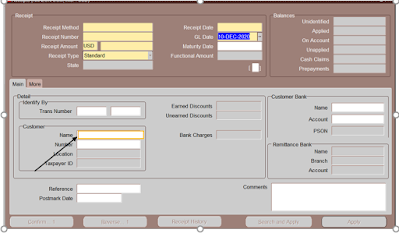 |
| Lov for Highlighted Field needs to be change |
Step1:- Select Field that needs a Change in LOV, in this case it is Name,
Go to Help --> Diagnostic --> Examine
This will give you Exact Block_Name.Field_Name , In this case it is RGW_FOLDER.M_CUSTOMER_NAME
Step2: - We have to find out LOV Name mapped on the Name Field and corresponding Record group Query.
(Note - For following Step , make sure your Form Builder setup is completed. Copy resources, plsql and forms Folder from AU_TOP to your local and Add these folder in your Forms_Path.)
Open FMB (ARXRWMAI.fmb) in your form builder, and search for M_CUSTOMER_NAME Field in RGW_FOLDER Block.
Check properties of this field and get LOV name. In our case it is "RGW_CUSTOMER_NAME_NOSKIP"
Now go to List of value section in the form and search for your LOV (RGW_CUSTOMER_NAME_NOSKIP) and get the Record Group name. In our case it is 'RGW_CUSTOMER_NAME'
Go to Record Group and Get the Query of this Record Group.
select rtrim(substrb(party.party_name,1,50)) "party_name",
cust_acct.account_number "account_number",
party.jgzz_fiscal_code "jgzz_fiscal_code",
party.tax_reference "tax_reference",
cust_acct.cust_account_id "customer_id",
cust_acct.fob_point,
null "fob_point_meaning",
cust_acct.ship_via,
null "ship_via_meaning",
cust_acct.primary_salesrep_id,
null "primary_salesrep_name",
null "primary_salesrep_num" ,
cust_acct.account_name account_description
from hz_cust_accounts cust_acct,
hz_parties party,
hz_customer_profiles cp
where cust_acct.cust_account_id = cp.cust_account_id (+)
and cust_acct.party_id = party.party_id
and cp.site_use_id is null
and (( (:ar_world.site_required_flag = 'Y' ) and
EXISTS (SELECT 1 FROM HZ_CUST_ACCT_SITES
WHERE CUST_ACCOUNT_ID = CUST_ACCT.CUST_ACCOUNT_ID
)
)
or :ar_world.site_required_flag = 'N')
Step3:- Now we have to use the Record Group query identified in last step and modify it, as per our business requirement using Form Personalization.
Go to Help-->Diagnostic--> Custom Code--> Personalize
A)- Add New Entry
Seq: XX
Description: Modify Bill to Customer Name LOV
Condition : WHEN-NEW-ITEM-INSTANCE
Trigger Object : RGW_FOLDER.M_CUSTOMER_NAME
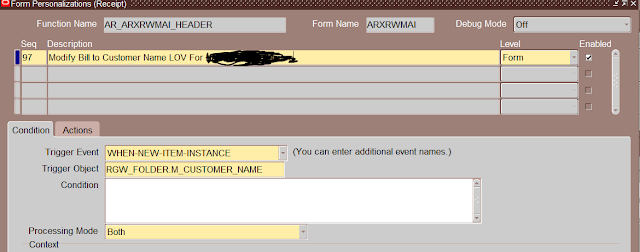 |
Add New Entry |
B) -Go to Actions
Seq:1
Type: Builtin
Builtin Type : Create Record Group From Query
Argument : Type your Modified Query
Group Name: XX_AR_GRP_NAME
Note : Sometime Query May give an Error like frm-40502: oracle error: unable to read list of values,
Make Sure the Field that is mapped with your Field i.e. Party Name doesn't have any Alias in this Case
"select party.party_name,
cust_acct.account_number "account_number",
party.jgzz_fiscal_code "jgzz_fiscal_code",
party.tax_reference "tax_reference",
cust_acct.cust_account_id "customer_id",
cust_acct.fob_point,
null "fob_point_meaning",
cust_acct.ship_via,
null "ship_via_meaning",
cust_acct.primary_salesrep_id,
null "primary_salesrep_name",
null "primary_salesrep_num" ,
cust_acct.account_name account_description
from hz_cust_accounts cust_acct,
hz_parties party,
hz_customer_profiles cp
where cust_acct.cust_account_id = cp.cust_account_id (+)
and cust_acct.party_id = party.party_id
and cp.site_use_id is null
and (
EXISTS (SELECT 1
FROM HZ_CUST_ACCT_SITES_all HCAS,
hz_cust_site_uses_all hcsua,
hz_party_sites hps
,hz_locations hl
WHERE CUST_ACCOUNT_ID = CUST_ACCT.CUST_ACCOUNT_ID
AND hcsua.cust_acct_site_id = hcas.cust_acct_site_id
and hcas.party_site_id=hps.party_site_id
AND hps.location_id = hl.location_id
and hl.country = 'XX' -- Select a Particular Country Customer
and hcsua.site_use_code= 'BILL_TO'
)
)"
C)- 2nd Action
Seq 2:
Type: Property
Object Type : LOV
Target Object : Name of LOV identified in 2nd Step (RGW_CUSTOMER_NAME_NOSKIP)
Property Name: GROUP_NAME
Value : XX_AR_GRP_NAME
Save You work Close the Form and try LOV, it should have been modified.
Happy Learning!!!!


